

How to use these APIs?
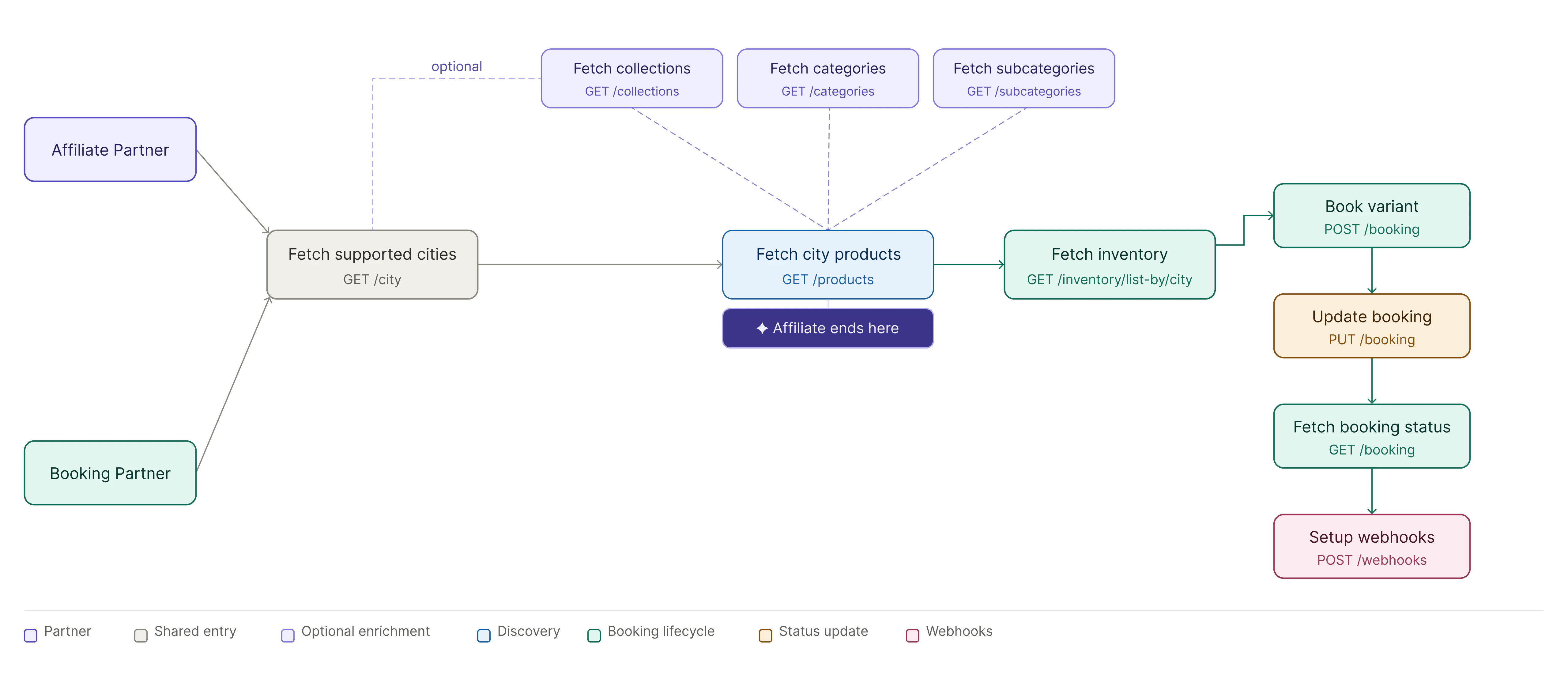
Headout Booking Partners
Headout offers different API products for various business needs. Make sure to choose the right one for your specific use case.- Headout API for Booking Partners
- Headout API for Affiliates
Booking partners have access to the full suite of APIs — from product discovery through to booking, ticketing, and post-booking management.
Get Supported Cities
API: List CitiesFetch the list of cities supported by Headout. Use this to populate a city picker in your UI. Every product is scoped to a city, so this is always the starting point.What you get: city code, city name, country, and coordinates.
Fetch Products for a City
API: List ProductsPass a
cityCode to retrieve all available products. Paginate using offset and limit. You can optionally filter by collectionId, categoryId, or apply a currencyCode and languageCode for localisation.What you get: Product listings with IDs, titles, pricing summary, media, and category metadata.Get Full Product Details
API: Get ProductFetch complete details for a specific product. It returns all variants, their cancellation and reschedule policies, input fields required at booking time etc.What you get: Variants, pricing tiers, input field definitions, policies, media, and deep-link URLs.
Read the
variantInputFields carefully — these define exactly what guest data you must collect before calling the Booking API.Check Real-Time Availability
API: List InventoryFor a specific product and date range, fetch live inventory. This returns available time slots, pax types (Adult, Child, etc.), and pricing per slot. Always call this in real time — never cache inventory.What you get: Time slots with
startDateTime, endDateTime, available pax types, netPrice, and headoutSellingPrice (the minimum selling price you must respect).Create a Booking
API: Create BookingSubmit the booking with the selected time slot, pax counts, and guest details collected from the input fields. The booking is created and immediately proceeds to payment capture.What you get: A booking object with a
bookingId and initial status UNCAPTURED.| Status | Meaning |
|---|---|
PENDING | Payment captured, booking confirmed with supplier |
UNCAPTURED | Pre-payment state — does not lock inventory or price |
Track Booking Status & Retrieve Tickets
APIs: Get Booking · List BookingsPoll the booking status or use webhooks (see next step). Once status is
COMPLETED, the tickets array is populated with ticket objects for delivery to the customer.Status progression:| Status | Action |
|---|---|
PENDING | Treat as confirmed, await ticket generation |
COMPLETED | Ticket ready — deliver to customer |
FAILED | Booking failed — surface error to user |
CANCELLED | Booking cancelled |
For products where
instantConfirmation: false, tickets may take up to ~30 minutes. The voucherUrl always reflects the latest state and can be shown to the customer immediately.Receive Real-Time Updates via Webhooks
APIs: Create Webhook · Webhook PayloadRegister a webhook endpoint to receive
POST notifications whenever a booking status changes. This is the recommended alternative to polling.What you receive: bookingId, new status, and eventTimestamp.Cancel or Reschedule (if needed)
APIs: Cancel Booking · Reschedule BookingIf a customer requests a change, submit a cancellation or reschedule request. Eligibility is determined by the
cancellationPolicy and reschedulePolicy returned in the Product Details API — always check these before surfacing the option to the user.What you get: An acknowledgement response with success and a message describing the outcome. Final status is delivered via webhook.High-Level Integration Flow
Headout inventory follows a strict hierarchy:City → Product → Variant → Time Slot → Booking → Ticket
Typical End-User Journey
- User selects a city
- Partner fetches all products for that city
- User selects a product and variant
- User selects date and time slot
- Partner fetches real-time availability
- User enters guest details and completes payment
- Booking is confirmed
- Ticket is generated (instant or delayed)
- Booking updates are received via webhooks
Product Discovery, Variants & Policies
Cities & Products
- Products are always fetched at a city level
- B2B APIs return all products, without B2C groupings (e.g. bestsellers)
Variants
A single product can have multiple variants. Variants can differ by many parameters, including but not limited to:- Inclusions and exclusions
- Cancellation or reschedule eligibility
- Meeting point or pickup details
- Ticket type and fulfillment behavior
- Pricing and availability patterns
Cancellation & Reschedule Policies
Cancellation and reschedule behavior is defined explicitly in the Product Details API. Important characteristics:- Cancellation is allowed or not allowed (true / false)
- Rescheduling is allowed or not allowed (true / false)
- Policies may differ across products and across variants of the same product
- Read and rely on the API response
- Surface the correct policy to users before booking
- Not assume uniform behavior across variants
Inventory, PaxTypes & Pricing
Real-Time Inventory
- Availability is fetched at variant + date level
- Inventory is time-slot based and highly dynamic
- Inventory must always be fetched in real time
PaxTypes
- Defined at time-slot level since we are aggregating the suppliers at the backend
- Can vary between slots for the same variant
- Examples include Adult, Child, EU Adult, Non-EU Adult
Pricing
Each inventory response includes:netPrice→ partner costheadoutSellingPrice→ minimum selling price (MSP)
Guest Details & Dynamic Input Fields
Some Variants require additional guest information beyond name/email/phone.Input Fields
Input fields are defined dynamically in the Product Details API for each variant and specify:- Who’s detail is needed for the booking (level is
PRIMARY_CUSTOMERorALL_CUSTOMER) - Data type (Boolean, String, Integer, Enum, Location)
- Optional predefined values (for all ENUM and some LOCATION fields)
Guest Objects
- A guest object is required for every pax booked
- Empty input field objects for each guest must be added if no fields are required for those guests
- This ensures reconciliation between pax count and guest data
Booking Lifecycle & Statuses
Two-Step Booking Model
| Status | Meaning |
|---|---|
UNCAPTURED | Optional pre-payment state |
PENDING | Payment done, booking confirmed |
COMPLETED | Ticket generated and available |
FAILED | Booking failed |
CANCELLED | Booking cancelled |
UNCAPTUREDdoes not lock price or inventoryPENDINGcan be treated as confirmed- Booking statuses are fluid, not terminal
Ticket Generation & instantConfirmation
Each product includes an instantConfirmation flag:
| Value | Meaning |
|---|---|
true | Ticket generated immediately |
false | Ticket generated with delay |
- Instant confirmation: < 1 minute (avg)
- Delayed generation: ~30 minutes on average, p99 up to 1 day before experience
- Booking should still be shown as confirmed
- Ticket generation is asynchronous
- Voucher updates automatically when the ticket is ready
Voucher URL & Ticket Delivery
Voucher URL — Key Points
- Acts as the single source of truth
- Shows booking status, ticket state, and experience instructions
- Can be Headout-branded or re-skinned by the partner by masking out the Headout logo and contact details
- Guides users clearly for delayed ticket generation
Ticket Types
Available in the booking details response. Each ticket object includes atype field:
| Type | URL present | Description |
|---|---|---|
QRCODE | No | QR code rendered inline |
BARCODE | No | Barcode rendered inline |
TEXT | No | Plain text ticket code |
PDF_URL | Yes | Link to downloadable PDF ticket |
HTML_URL | Yes | Link to hosted HTML ticket page |
APPLE_WALLET_URL | Yes | Apple Wallet pass URL |
GOOGLE_WALLET_URL | Yes | Google Wallet pass URL |
Sandbox vs Production Behavior
Sandbox Environment
Only a limited set of products transition toCOMPLETED automatically. See Fulfilment on Sandbox for the full list.
- All other sandbox bookings may remain in
PENDING - Sandbox should be used to validate: booking flow, webhooks, voucher rendering, and status transitions
Production Environment
- Real supplier behavior applies
- Ticket generation follows
instantConfirmation - Cancellation and reschedule rules are enforced strictly
Webhooks & Booking Updates
Webhooks are essential to:- Track ticket generation
- Receive cancellation or reschedule updates
- Handle failures
- Keep booking state in sync
- Status transitions are non-linear
- Completed bookings can still be cancelled (ex: in case of venue closures etc)